

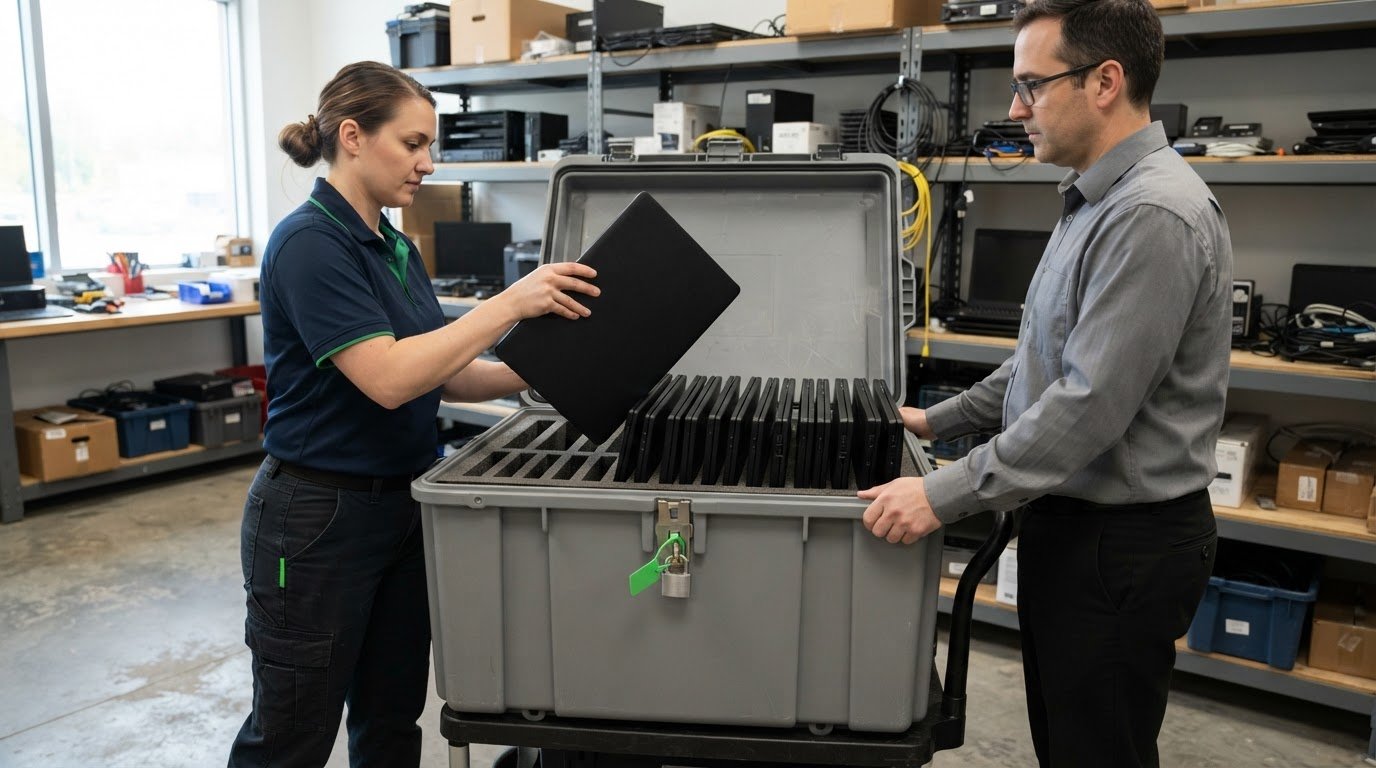
A laptop’s final destination should depend on its data and condition, not just convenience. Physical destruction may suit faulty or end-of-life laptops, or be required by company security policy; secure wiping can make usable devices available for reuse. Secure disposal of company laptops also means protecting business information before equipment leaves your organization.
A clear process can protect sensitive information while avoiding unnecessary waste. This guide explains how to prepare laptops for retirement, choose between data wiping and physical destruction, and assess an IT asset disposition process. It also covers what to consider when arranging secure pickup across Canada, so retired equipment is handled responsibly and usable technology can serve a second purpose.
Key Takeaways
- Sort retired computers, storage media, servers, and peripherals by condition and data sensitivity to direct each item to an appropriate next step.
- Don’t rely on deleting files or factory resetting a laptop; understand why secure data handling matters before equipment leaves your organization.
- Assess an IT asset disposition process for secure handling, clear documentation, and responsible recovery or recycling of equipment.
- Plan Toronto pickup around the equipment being collected and its handling needs, so retired devices can move through disposal responsibly.
How can I dispose of unwanted electronic devices and media (e-waste)?
Sort equipment by type, condition, and data sensitivity, then plan for reuse, recycling, or responsible disposal. Accepted materials and collection options can vary by province. Environment and Climate Change Canada maintains an inventory of e-waste recycling programs to help identify local options.
-
Recycle Computers and Storage Media
Separate computers, servers, peripherals, and storage media before arranging recycling. For example, group laptops and desktops separately from keyboards, cables, and external drives, since programs may accept different items. Identify storage devices containing business information and keep them under your organization’s information-handling process until they’re sanitized or physically destroyed. Putting a drive with other electronics does not remove its data.
Responsible electronics recycling can recover materials such as recyclable plastics and gold. Keep components together when they belong to a working system, and identify damaged or incomplete equipment so it can be sorted appropriately.
-
Consider Remarketing and Recycling
Assess whether each computer or server can be reused before sending it for material recovery. A working laptop with useful remaining life may be suitable for remarketing or charitable reuse after its data is securely handled; broken or obsolete equipment may be better suited to recycling. Separate these groups rather than treating every item as identical e-waste.
Choose how to handle storage media based on data sensitivity and your organization’s security policy. Sanitization can remove data while keeping media usable; physical destruction, including shredding, is an option when media must not remain usable.
-
Check Provincial Disposal Requirements
Identify the province where each load is held, then review the relevant e-waste program’s accepted materials and collection process. Environment and Climate Change Canada’s inventory can help locate recycling programs across Canada. Check whether a program accepts business computers, servers, peripherals, and storage media before grouping items for collection.
Keep equipment separated by type and identify items that need secure data handling. This makes hand-off more orderly and helps prevent storage media from being treated as ordinary scrap. Direct electronics to a recycling program that recovers materials rather than putting them in general waste.
What Is Laptop Disposal for Businesses?
Retire business laptops only after their stored information has been securely handled. For devices containing personal information, follow your organization’s applicable privacy obligations and information-management policies; requirements depend on the organization and its context.
-
Understand the Limits of Deleting and Resetting
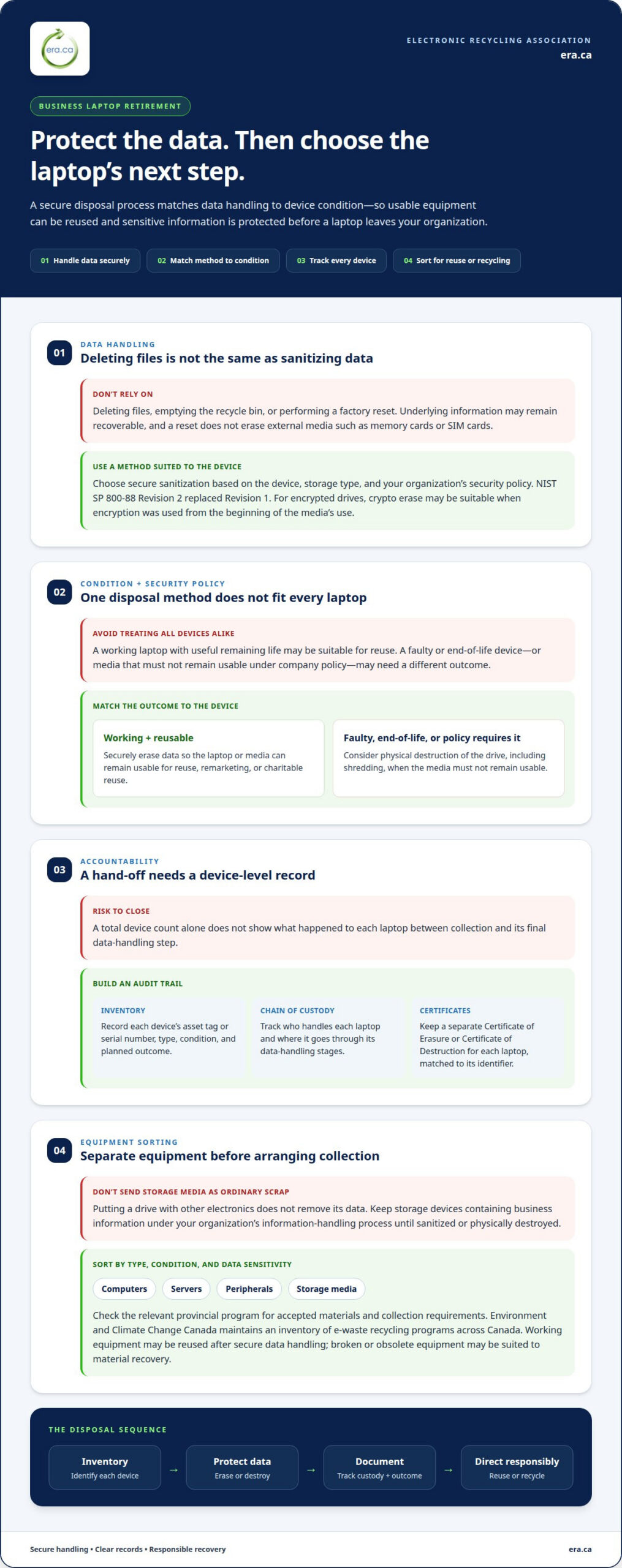
Don’t confuse deleting files or performing a factory reset with data sanitization. Deletion or emptying the recycle bin removes ordinary access, but underlying information may remain recoverable. A factory reset also doesn’t erase data on external media such as memory cards or SIM cards. Neither step proves a laptop is ready to leave your organization.
-
Sanitize Data Using NIST SP 800-88
Choose a sanitization method that suits the device, storage type, and security policy. Sanitization is designed to permanently remove data while allowing media to remain usable; deletion alone doesn’t achieve that. NIST SP 800-88 Revision 2, published in September 2025, replaced Revision 1. For encrypted drives, crypto erase may be suitable when encryption was used from the media’s beginning.
Use secure data erasure when a working laptop can be prepared for reuse. Consider physically destroying the drive in a faulty or end-of-life device, or when company policy requires it.
-
Maintain Chain of Custody and Certificates
Track each laptop from collection through its final data-handling step. A clear chain of custody records who handles devices and where they go, helping close gaps between hand-off and processing. Keep an inventory that identifies each laptop and its planned outcome, rather than relying on a total device count alone.
Request a separate Certificate of Erasure or Certificate of Destruction for each laptop. Match each record to the device identifier and retain the documents with decommissioning records. This creates a useful audit trail for your organization.
-
Consider Canadian Privacy Laws
Identify the privacy obligations that apply to your organization before retiring laptops containing personal information. Requirements may depend on your jurisdiction and sector, so don’t assume one rule applies to every business. Use internal information-management policies to guide secure handling, sanitization, documentation, and the choice between erasure and destruction.
Where physical destruction is required, secure data destruction provides a way to address storage media that shouldn’t remain usable. Keep the resulting device records with the organization’s disposal documentation.
IT asset disposition provider selection
Choose an IT asset disposition (ITAD) process that connects asset tracking, secure handling, documentation, and responsible reuse or recycling. A structured approach helps keep sensitive equipment accounted for from retirement to final disposition.
- Define what the ITAD process must handle before equipment leaves your organization. Include laptops, storage media, servers, and peripherals, then identify which devices contain sensitive information. Set the intended outcome for each item, such as reuse, remarketing, recycling, or destruction. Clear categories help keep data security and material recovery aligned.
- Maintain an inventory that identifies each device individually. Record its asset tag or serial number, equipment type, condition, and planned outcome. Asset tracking connects the inventory to each handling stage, while device-level records make missing equipment easier to spot than a single collection total.
- Map the chain of custody from collection through processing to final disposition. A sound process records transfers, uses vetted personnel, and maintains itemized documentation for each device. These records show how equipment was handled and help identify gaps if a laptop or drive cannot be matched to its inventory entry.
- Set data-handling requirements before devices are assessed for reuse. Require secure sanitization or physical destruction according to each device’s condition, data sensitivity, and your organization’s policy. Link erasure or destruction records to the corresponding asset. This helps prevent a laptop from being reused while its stored information remains recoverable.
- Review how the disposition process documents and routes equipment. Decommissioning records support audit readiness, while clear reuse and recycling categories show where assets go next. For secure destruction, EN-15713 is an accreditation cited as something to check. Keep the selected route and supporting records together for each device.
Secure laptop pickup and disposal in Toronto
For organizations across Canada, a secure process connects pickup, data handling, and final disposition. Prepare an asset inventory, decide how each device’s data will be handled, arrange collection, and retain records showing the outcome for each laptop.
-
Arrange Secure Laptop Pickup
Prepare an inventory before pickup, listing each laptop’s asset tag, condition, and intended outcome. Separate laptops from peripherals and identify devices requiring secure data destruction. This helps account for each item as it leaves your workplace. Avoid mixing unidentified devices into general boxes, since that can make individual tracking harder.
Group equipment by type and handling requirements. For example, keep laptops requiring destruction separate from devices intended for reuse. This supports a clear hand-off and helps ensure each device receives the appropriate handling.
-
Complete Laptop Disposal
After pickup, direct each laptop to its planned outcome: sanitization if suitable, physical destruction when required, or recycling for end-of-life equipment. A laptop prepared for reuse needs its data handled before it reaches another user. Record each outcome separately in the inventory instead of marking every device simply as “disposed.”
Match the final processing record to each laptop’s asset tag. Keep relevant erasure or destruction documentation with the decommissioning record so each device’s path is traceable from collection to outcome.
- Coordinate collection around the equipment being retired and its data-handling needs. Keep the inventory available at hand-off, and ensure collection records identify the equipment being transferred. A consistent process reduces confusion when a load includes laptops with different intended outcomes.
- Close the process by reconciling collected devices against the inventory. Record whether each laptop was sanitized, destroyed, reused, or recycled, and retain the associated documentation. To arrange electronics pickup for retired equipment nationwide, prepare an accurate device list and assign each item its intended disposition.
Electronic Recycling Association (ERA): Secure data destruction
The Electronic Recycling Association (ERA) supports businesses retiring laptops that need secure data destruction, electronics pickup, or responsible recycling. Use these services when devices are ready to leave your organization and their data must be handled before reuse or material recovery.
ERA’s free electronics recycling and donation program helps direct suitable equipment toward another use and keeps end-of-life electronics out of general waste. For a company collection anywhere in Canada, organize the equipment and identify which devices need data destruction, recycling, or donation. This gives the hand-off a clear purpose and helps each laptop follow its intended path.
Contact Electronic Recycling Association (ERA) to discuss your company’s retired laptops and electronics.
Make your next equipment transition count
Build secure disposal of company laptops into regular equipment planning instead of treating retired devices as an afterthought. A consistent process gives your team a practical way to protect business information, account for equipment, and direct usable technology or materials to a responsible next step. It can also simplify future equipment refreshes by clarifying how devices move from active use to their intended outcome.
For Toronto organizations preparing a collection, Electronic Recycling Association (ERA) offers electronics pickup, secure data destruction, and free electronics recycling. These options can help connect information handling with responsible equipment recovery, so the end-of-life process supports both organizational needs and broader community benefit.
Take the next step with a clear plan for your retired equipment. Contact Electronic Recycling Association (ERA) about your company’s electronics and move forward with a responsible transition.
Frequently Asked Questions
When Is Physical Destruction Required?
Use physical destruction when a laptop is faulty or at end of life, or when company security policy requires it. It may also suit highly sensitive information when your organization’s risk controls require storage media to become unusable. For example, a damaged drive that can’t be reliably sanitized may be destroyed, while a working laptop intended for reuse may be wiped instead.
How Do HDD and SSD Sanitization Methods Differ?
Choose a method suited to the storage technology: HDDs use magnetic storage, while SSDs and other flash-based media do not. Degaussing can’t erase an SSD, including a USB flash drive. Crypto erase may suit an encrypted HDD or SSD only if encryption was used from the beginning of the media’s life cycle. Identify the drive type first, then select a compatible method.
Is deleting the same as sanitization?
No. Deleting a file or emptying the recycle bin removes ordinary access, but the underlying data may remain recoverable. Sanitization is intended to make stored information inaccessible for recovery. Before retiring a laptop, consider removable media too: a factory reset doesn’t erase data on memory cards or SIM cards. Disconnect the device from online accounts as part of your disposal preparation.
What is device sanitization?
Device sanitization means permanently removing data from a device or storage medium so it can’t be recovered or accessed. Unlike physical destruction, it can leave working media available for reuse. For example, a company may sanitize a functioning laptop before redeployment, while sending a failed drive for destruction if it can’t be properly erased.
How do businesses securely erase laptop hard drives and SSDs?
First identify the storage type and back up any information your organization needs to retain. Then use a sanitization method suited to the drive and security requirements. For an encrypted SSD, crypto erase may be appropriate if encryption was used throughout the media’s life cycle. Record the device identifier and erasure outcome so the action is traceable in asset records.
When should a company use data wiping versus physical destruction of laptop drives?
Choose data wiping when a drive works and the laptop may be reused, redeployed, or donated. Choose physical destruction for faulty or end-of-life equipment, or when policy requires the drive to be unusable. Consider the data’s sensitivity, the drive’s condition, and whether the sanitization method suits the storage technology. For secure disposal of company laptops, match the method to each device.